Hvor-side (Where-page)
The first project that i started on, after my education was an idea that my dad came up with. He is also more on the technical side, and has his own server, domain and mail-server. This project surrounded the mail-server. As it manages the mail for each member of our family, it also logs every lookup request the mail-server receives.
My dad wanted to display these logs in a better way then reading through a large text-file. The things my dad was interested in were:
- When was a request made.
- Where was it sent from.
- And to which user, was the request made for.
This could be used to monitor and track where the person was at that time. And also look for shady requests from unknown locations.
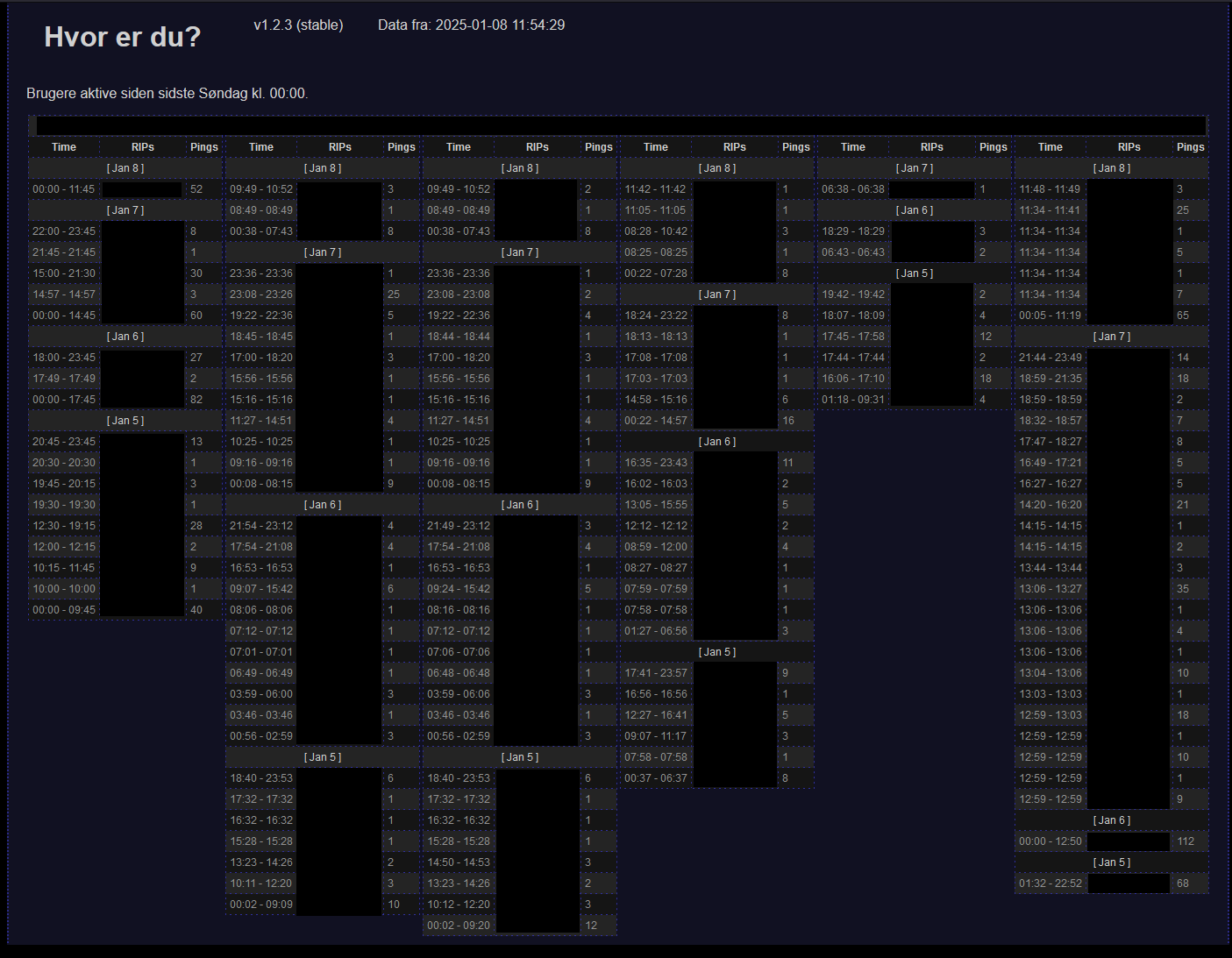
Technical information
About the mail requestThe mail requests are made from your phone or computer every now and then, to inform you of new mail. The requests contain the address from where it was made from. That means, we could track where a device was requesting from, thanks to its IP address.
FilteringThe server was setup to dump new logs into a single text file, that would contain hundreds and thousands of logs. Throughout the large log-file, only a few of the logs were actually relevant to us. You see, the server seems to throw all kinds of logs into that one file. So we needed a way to filter out irrelevant logs. So we only process the data that we need.
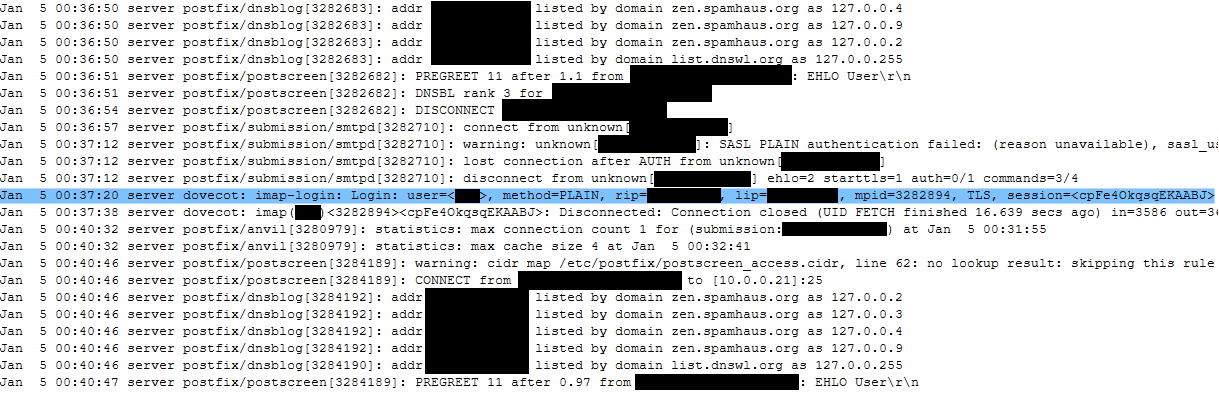
The logs where displayed line for line, in a CSV (Comma-separated Values) format. Turning these lines into usable data, can easily be archived with the use of the 'Split()'-method, or in the case of PHP, the 'explode()'-method. These methods can separate a string, by each comma, into an array of string. Effectively turning the CSV into an string array of values. Which are much easier to work with later.

The last challenge was to match certain data together into groups. This would be relevant later as it solves one of our future issues.
Development Phase
The plan was to create a html page and display the content via a browser. This would make it easy for me to make, since I at the time, had a lot of experience working with HTML, CSS, and JavaScript. My dad had setup a PHP-page to the server, that i could start to work on. This was my first time working with PHP, and and i was very excited to try it out.
First attemptWhen i made my first attempt to handle the large text file, i thought to make my own reader. I love creating methods that have very high performance. So i thought to give it a try:
The root of my concern for performance was the function, 'explode()' (More commonly know as 'Split()' in other languages). You see, I would need to use multiple 'explode()' function. One to separate the lines with '\n' and one to separate the values with ','.
In my mind the method 'explode()' would work like this: It would iterate through each character in the string, until it finds separator. Then it create a substring from the first index to the current index, then it would repeat the process until it reached the end of the string. This operation would be an O(n). But me needing to use this method Twice on the same stings, let me to think of this as O(N*2).
From here, I attempted to create a method that would only run over each character once. It did not go well. First of all, it looked very messy, and was very complex to debug. First the entire log was stored as a string. Then it would go through an incrementor that iterate trough the string for each character.
Then a method would be executed, that would test if the character, or the recent series of character, meet the current stage's criteria. If it did, then the incrementor would continue, and the next method would be executed instead, as a change in stage. This was to filter out the unwanted logs, and also isolate the values one by one.
OptimizingWhen it was finished, I discovered that the loading of the page was tremendously slow. I sometime had to wait ~20 seconds or so for a reply. After debugging, and attempting to improve the code, I finally gave up, and tried the 'explode()'-method. After swapping everything out i finally got good results. I also wanted to include that i did not load the entire log as a sting, and instead used the 'fgets()'-function to only read one line at a time. With this the page would load within milliseconds.
One of the reason for why this was a lot faster has to with the methods already being optimized. And Secondly, memory efficiency. Reading the whole file into one string in memory is very exhausting for the application. Especially when we know we only really need less then ~5% of that data.
Regular expressionWhile working with the 'fgets()'-function, I still needed a way to filter out and separate the data-values from each line. I had originally thought to use 'explode()'-function and then match each value by a specific index. But i then finally ended on the topic of Regular expression.
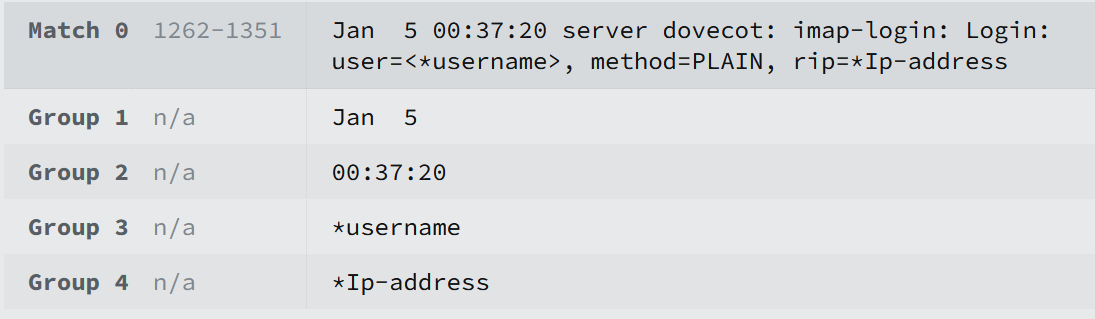
Regular expression (Also knowns as regex) is a sequence of characters that specifies a pattern in text. Using the PHP method 'preg_match()', i would be able to use regex to filter out and retrieve the data values in a very optimized way. The pattern i ended up with is this one:
$pattern = '/(\w{3}\s+\d{1,2}) (\d{2}:\d{2}:\d{2}).*?imap-login:\WLogin.*?user=<([^>]+).*?rip=([^,]+)/';
This expression will create 4 Groups: One for Date. One for Time. One for username. And one for the incoming IP address. Like so:
Displaying data
While working on the project, i realized a problem with the way that i was displaying the data. The logs would be display in columns for each user, with each log being its own row. Dependent on the devices, a user could receive 100 pings each day. This would result in a very long page, of request from the same location.
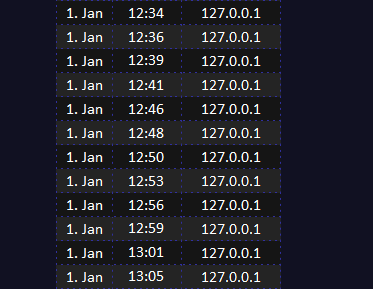
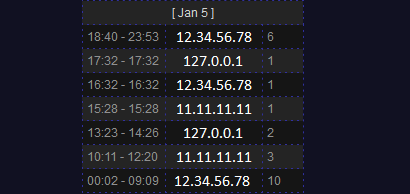
To solve this issue I thought to combine the request, if they kept being sent from the same address. This way we could mark down the time, from when we started receiving pings from this address, until it stopped, and then changed to a new one.
This compressed all the logs down, and made it a lot easier to read where a device was sending from, during a specific time. I would call these ping-group, since i could also display the number of pings that were received from this location. Making the display look like this:
IP address lookup tables
To keep better track over the location of IP addresses, I thought to give them names. My dad already had a list of names for some IPs. And they were all already stored in a text file on the server. This was pretty easy to make use of, since the file was structured like this:
                0.0.0.0 name1
                0.0.0.1 name2
                0.0.0.2 name3
                0.0.0.3 name4
Using the 'explode()' function using ' ', separates the lines into pairs of IPs and names. From there we replace the IPs from logs with the names from the list. This is not visible in the screenshots since i censored all IPs, and IP-names.
Another thing i did, was make it so that you could click on any IP addresses or IP-names. This would display the actual IP address where the time was displayed, and replace the IP address field with a prompt to over-write the IP's name. Pressing enter after writing would send a form-request to another script on the server, that would change the name of the IP in a file. This file is exactly like my dad's "IP's to names" file, but since i didn't want to override it, i just made my own. This would mean that the page now had 2 IP lookups to do.
Final issuesThe last issue that i found was, if a person had a phone on one network and a computer on another. Then the server would get alternating pings from each IP. This would break my script, made to compress the logs. This wasn't a big issue in this project, but could be a bigger issue with people with many devices.
A fix could be to compress the latest n IP addresses request, instead of just the 1. But this would be hard to display, and would ultimately make it more confusing to read.
Another fix could be to filter out the alternate request based on time. Fx. if we got to alternating requests, then we could keep an eye on the first one, and if more then 5 minutes went by, then its likely not active anymore. Then we could switch the focus to the other IP address. Although this method has its problems of its own. Since the timing of the requests might be veering a lot, its har to specify the length of timeout duration. And making it too long might discard logs that are relevant, and would give a untrustworthy result.
GitHub RepositoryNo github yet.